
2. Selecting the Ink Type and Performing Manual Maintenance During Ink Filling
Procedure
- On the Ink Type Not Set screen, select the ink type to use.
- Tap OK.
- Tap Execute.The Manual Maintenance During Ink Filling screen appears.MEMO
If work is canceled due to a reason such as an error occurring or the sub power turning off, the message Discard the discharged fluid in the bottle. will appear on the operation panel when ink filling is resumed.
When this message appears, remove the drain bottle and discard the discharged fluid.
- Follow the on-screen instructions and attach the following parts.
- Wiper
- Flushing sponge
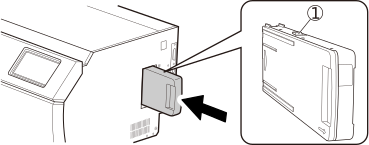
- Cleaning liquid cartridgesOrient the cartridge so its protrusion () is face up, and then, while keeping the cartridge level, insert the cartridge as far as it will go.
- Click Finish All.