
2. Perform a printing test to check the results.
-
Set up the object to be printed on.
RAPPELChargement de l'objet et définition de la hauteur de la surface d'impression et du point de départ de l'impression
The printing test requires an object with a W (width) of 170 mm (6.7 in.) or more and an L (length) of 90 mm (3.55 in.) or more. Set the bottom right of the object to the base point, and then carry out a printing test.
-
Tap
 Nozzle Drop-out Test on the home screen.
-
Tap
Execute next to
Printing Test.
Printing of the test pattern starts.RAPPEL
Depending on the color of the object to be printed on, it may be difficult to check the white ink test pattern.
Tap
Nozzle Drop-out Test (Base: Black) is not displayed if the machine is not equipped with white ink.
Nozzle Drop-out Test on the home screen, and then select
to make the base of the white ink black, making it easier to check the white ink.
-
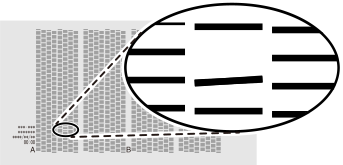
Check whether there is dot drop-out or dot displacement in the test pattern and whether its uneven colors have been eliminated.
-
Si vous avez ouvert le capot avant, fermez-le.
If no dot drop-out or dot displacement occurs and if there are no uneven colors, this operation is finished. Tap
 to return to the home screen.
If the dot drop-out or dot displacement location is different, perform medium cleaning another two or three times.
If this problem is not fixed, contact your authorized dealer.