
Specifying the Flat Table Position After Setup Completion
After the object to be printed on is set up, you can specify the movement destination of the flat table in advance. This action eliminates unnecessary table movement after setup, allowing printing to start immediately and reducing the time required to begin printing.
Procedimento
- Set up the object to be printed on.
-
Tap
 .
.
- Tap .
-
Select Posição da mesa após a conclusão da configuração from the following.
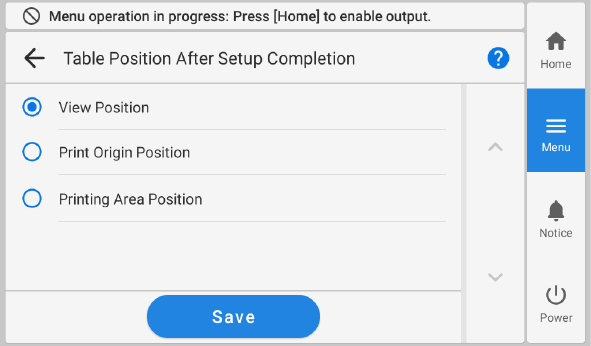
Posição da mesa após a conclusão da configuração Description Posição de visualização After setup finishes, the flat table moves forward.
Posição de origem da impressão After setup finishes, the flat table moves to the print origin position. Use this option in print modes that reference the print origin. Posição da área de impressão After setup finishes, the flat table moves to the trailing edge of the printing area. Depending on the print mode,*1 the reference will be the trailing edge of the printing area, not the print origin, so the flat table moves to this trailing edge. *1 Such as during one pass multilayer printing of or . - Tap Salvar to confirm your entry.
-
Tap
 to return to the home screen.
NOTA
to return to the home screen.
NOTA- Default setting: Posição de visualização