
Step 2: Setting the IP Address of the Machine to Connect
Procedure
- Determine the IP address of the machine.
Check the IP address of the computer and the IP addresses of other machines to determine the IP address of the machine.
When the IP address of the computer is 192.168.0.xxx
- IP address of the machine: 192. 168. 0. yyy
Enter any number from 1 to 254 for [yyy]. Ensure that they are different from the numbers of other network equipment.
- IP address of the machine: 192. 168. 0. yyy
- If the machine is off, press the power button to start the machine.
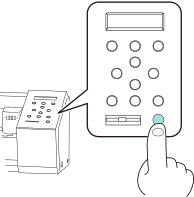
- Press MENU twice to display the screen shown below.

- Press ▼ once to display the screen shown below.

- Press ▶ once to display the screen shown below.

- Press ▼ three times to display the screen shown below.

- Press ▶ twice to display the screen shown below.

- Press ▶, then ▼ to set DHCP to OFF.

- Press ENTER.
- Press ▼ once to display the screen shown below.

- Press ▶ twice.
- Press ▲ or ▼ to enter the IP address of the machine that you determined in step 1.
Press ◀ or ▶ to move the cursor.
- Press ENTER.
- Press ▲ or ▼ to enter the IP address of the machine that you determined in step 1.
- Press MENU to return to the original screen.
- Repeat Steps 1 to 12 to set the IP address of the second machine.