
Start-up Cleaning
The print heads move at high speed while discharging ink. To prevent ink solidification and other contaminants from adhering to the nozzle surface of the print heads, clean the nozzle surface of the print heads before the start of daily operations. This cleaning is called "Start-up cleaning."
Before daily operations
Perform start-up cleaning before the start of daily operations.
IMPORTANT If the printer is not used for a period longer than one week, the risk of ink hardening increases.
MEMO The printer should not go unused for more than a week. To stabilize ink discharge, constantly operate the printer, even if the amount of daily printing has decreased. This constant printer operation leads to improved print quality.
If a media jam occurs
If the media has jammed, the media may have come into contact with the print head, resulting in a problem with the nozzle surface. Perform start-up cleaning.
If nozzle drop-out, ink drips, or dragging occurs
If any of the following symptoms cannot be corrected using the automatic cleaning function, perform start-up cleaning. Replacing the wipers is also an effective means of improving the symptoms.
| Nozzle drop-out | Ink drips | Dragging dirt |
|---|---|---|
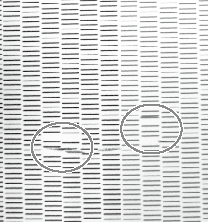 | 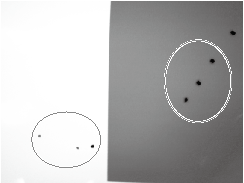 | 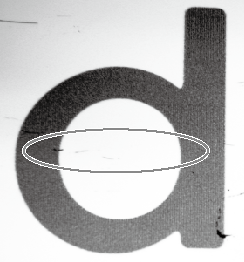 |
| Dust or other foreign matter adheres to the print heads and impedes correct ink discharge. | Ink pools in dust or dirt adhered to the print heads, and drips onto the media. | The phenomenon where dirt or dust accumulates on the print heads. |