
Windows
This manual contains operation explanations for the following versions. Operations and names may vary depending on the version and build of the OS.
Windows 11
Version: 24H2
Procedure
- Log on to Windows as the Administrator or a member of the Administrators group.
- Open Control Panel.Search for "Control Panel" from the taskbar.
- Click Network and Sharing Center.
- Click Ethernet or Wi-Fi.
- Click Properties.
If a User Account Control window appears, click Continue.
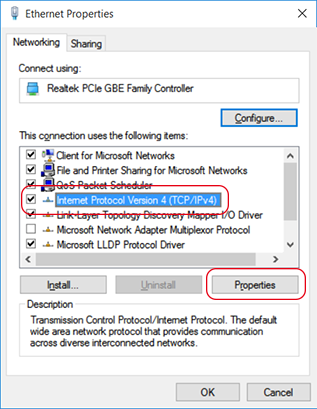
The Ethernet Properties or Wi-Fi Properties window appears.
- Select Internet Protocol Version 4 (TCP/IPv4), and then click Properties.
If the Internet Protocol check box is clear, select it.
- Confirm that Obtain an IP address automatically is checked.If it is not checked, click the box to check it.
- Click OK.
- Click Cancel in each window.