
Performing a Nozzle Drop-out (Dot Drop-out) Test
MEMO When performing printing tests successively, you can select Feed (vertical printing) or Scan (horizontal printing) as the printing position for the second and later tests in comparison to the first test.Performing Printing Tests Arranged Horizontally
Procedure
- Set up the media.
-
Tap
 Nozzle Drop-out Test on the home screen.
-
Tap Execute next to Printing Test.
Printing of the test pattern starts.
-
Check whether there is dot drop-out or dot displacement in the test pattern.
Missing blocks indicate dot drop-out. Collapsed or inclined blocks indicate dot displacement.
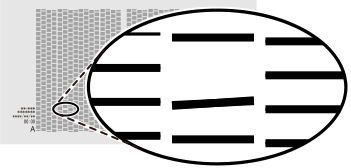
IMPORTANT Depending on the media, locations on which optimizer ink is printed may be difficult to check. If it is difficult to see the optimizer ink, switch to a different media and perform the printing test again. -
If you have opened the front cover, close it.
If no dot drop-out or dot displacement occurs, this operation is finished.
-
Tap
 .
The home screen appears.
.
The home screen appears.