
Performing a Printing Test for the Nozzle Mask
Procedure
- Set up the media.
-
Tap
 .
.
- Tap .
-
Select Nozzle Mask Test and tap Execute.
Printing of the test pattern starts.
-
Check for the nozzle group with dot drop-out or dot displacement by viewing the results of the printing test.
"1" or "2" is the nozzle group. The following shows a dot drop-out in nozzle group 2.
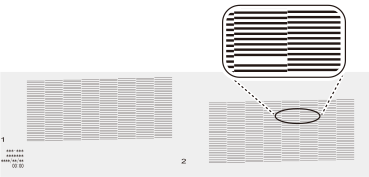
MEMOIf the printing-test results are difficult to interpret
Check the results in a bright location, changing your line of vision. They are visible using the reflection of the light.
- If you have opened the front cover, close it.
-
Tap
 to return to the home screen.