
Emergency Measure) Cleaning the Print Head Surface
This operation is an emergency measure. It may damage defect-free parts depending on the symptoms, worsening the symptoms. If you have any questions, contact your authorized dealer.
IMPORTANT
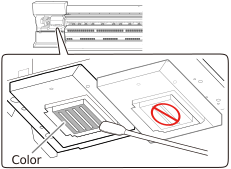
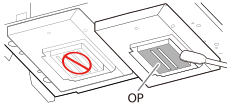
- Be sure to use different cleaning sticks in the color ink section and the optimizer ink section. Using the same cleaning stick may lead to the optimizer ink and color ink mixing, resulting in ink hardening and discharge issues.
- Do not touch the tips of the cleaning sticks with your hands. Skin oil affixing to the print head caps may lead to malfunctions.
- Do not use cleaning liquid other than the included cleaning liquid.
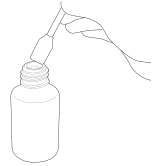
- If you add cleaning liquid while cleaning a given location, do not dip the cleaning stick into the cleaning liquid bottle. Instead, drip the cleaning liquid onto the cleaning stick.
Procedure
-
Tap
 on the operation panel.
- Tap .
- Tap Execute.
-
Tap OK.
The print head carriage moves to the left end of the machine.
The following procedure explains the procedure for emergency measures. Be aware that the procedure is different from ordinary manual cleaning.
-
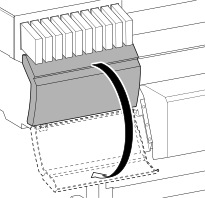
Open the left cover.
-
Moisten a new cleaning stick with the cleaning liquid.
IMPORTANT
- Be sure to use one of the included cleaning sticks.
- Do not use a previously used cleaning stick.
- Do not put a previously used cleaning stick into the cleaning liquid.
-
Very gently touch the cleaning stick against the print head surface (Color: color ink section).
Very softly press the cleaning stick against the print head so that cleaning liquid soaks into the print head surface (nozzle surface). Never rub the stick on the surface or press it forcibly.
-
Apply a large amount of cleaning liquid to a new cleaning stick.
-
Very gently touch the cleaning stick against the print head surface (OP: optimizer ink section).
Very softly press the cleaning stick against the print head so that cleaning liquid soaks into the print head surface (nozzle surface). Never rub the stick on the surface or press it forcibly.
- Close the left cover.
-
Tap Finish All.
Cleaning will start. The details of the operation in progress and the (approximate) remaining time of that work are displayed in the status bar at the top of the screen. When the work is finished, the status bar returns to its original display.
-
Tap
 .
The home screen appears.
.
The home screen appears.