
4. B: Fill the machine with ink (TH CMYK).
-
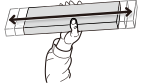
Gently shake all the ink cartridges.
The precipitation of the ingredients in the ink disables printing in normal color. Shake the ink cartridges so that the ink mixes well.
-
When the Install the ink cartridges in the even-numbered slots. screen appears, insert ink cartridges in the even-numbered slots.
IMPORTANT
Ink labels indicating colors are affixed to the machine. Insert each ink cartridge into the slot whose label matches the color of the ink in the cartridge. Inserting an incorrect cartridge may lead to breakdowns. Be careful not to insert the wrong cartridges. If you insert an incorrect cartridge by mistake, contact your authorized dealer.
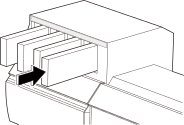
When all the cartridges are inserted correctly, the "Ink filling in progress. Please wait." screen appears.
-
When the Install the ink cartridges in the odd-numbered slots. screen appears, insert ink cartridges in the odd-numbered slots.
IMPORTANT
Ink labels indicating colors are affixed to the machine. Insert each ink cartridge into the slot whose label matches the color of the ink in the cartridge. Inserting an incorrect cartridge may lead to breakdowns. Be careful not to insert the wrong cartridges. If you insert an incorrect cartridge by mistake, contact your authorized dealer.
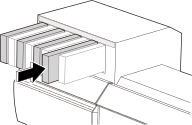
When all the cartridges are inserted correctly, the "Ink filling in progress. Please wait." screen appears.
-
Wait for ink filling to finish.
When the home screen appears, ink filling is finished.