
Test Printing from VersaWorks
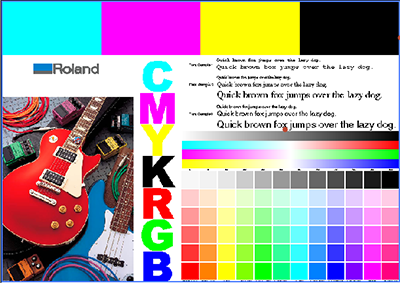
Printer operations can be used to print a test pattern for checking the nozzles. Correspondingly, the following pattern (approximately 260 × 182 mm [10.24 × 7.17 in.] *1) is printed from VersaWorks.
By printing the same data, it is possible to check for changes resulting from the different printer or environment, or changes of the print settings.
Procedimento
-
Select the printer to test printing from.
The background of the printer image changes to blue.

-
Click
 for the selected printer, and then select Impressão de teste.
The following message appears: A tarefa seguinte será impressa.Quer continuar?Check whether the media loaded in the printer is large enough for the displayed page size.
- Select the queue folder from Adicionar Tarefa para.
-
Click OK.
The job for test printing is added to the job list, and then processing by the RIP and printing automatically start. Once the job has been printed, it is automatically deleted from the job list.
- When the message Tarefa enviada com sucesso. appears, click OK.