
1. Clean the print head caps.
Procedure
- Remove any media.
-
Tap
 .
.
- Tap Manual Cleaning.
-
Tap Execute.
The print heads move to the left end of the machine.
-
Follow the instructions on the operation panel to perform Manual Cleaning.
- Tap
 or
or  to check the procedure.
 - If you complete the work without viewing the instructions, tap Finish All.
IMPORTANT- Be sure to use one of the included cleaning sticks.
- Do not use a previously used cleaning stick.
- Do not put a previously used cleaning stick into the cleaning liquid.

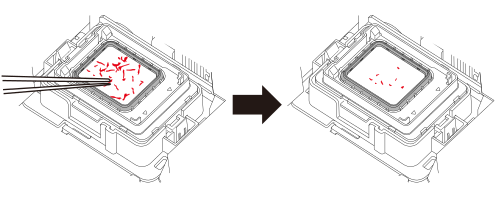
IMPORTANTUse a pair of tweezers to remove the pieces of hardened ink that are 3 mm (0.12 in.) or more in length.
Do not use excessive force when pulling on pieces of hardened ink that are difficult to remove. Doing so may damage the print head caps.
。
When you have finished cleaning, close the right cover.
- Tap