
2. Select the Ink Type and Set the Cleaning Liquid in Its Slot
Procedure
- Make sure S-PG2 CMYKW is displayed on the Ink Type Not Set screen.
- Tap Execute.
- Perform manual cleaning during filling the machine with ink.IMPORTANT
Manual cleaning during filling the machine with ink must be performed by a suitably qualified worker.
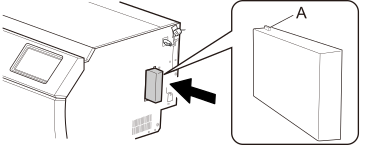
- Set the cleaning liquid cartridge in the cleaning liquid slot.
Orient the cartridge so its protrusion (A) is face up, and then, while keeping the cartridge level, insert the cartridge as far as it will go.
IMPORTANTDo not insert ink cartridges into the cleaning liquid slot. Inserting an incorrect cartridge may lead to breakdowns. Be careful not to insert the wrong cartridges. If you insert an incorrect cartridge by mistake, contact your authorized dealer.
- Tap Finish All.