
Step 1: Removing the Retainers
This work must be performed before connecting the power cord.
The power turning on inadvertently during these operations may result in pinched hands or other injury.
Be sure to remove the retainers and screws.
Any that remain may cause faulty operation or breakdown when the power is switched on.
- Open the front cover.
-
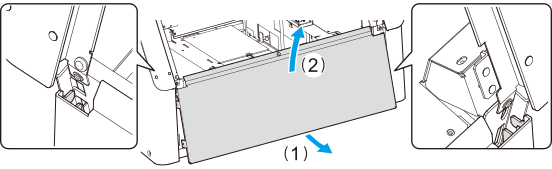
Remove the maintenance cover according to the following
procedure.
-
Lift the maintenance cover up to remove it.
-
Lift the maintenance cover up to remove it.
-
Remove the print-head carriage's retainer and the flat table's
retainer.
MEMO
If the screws fall under the flat table
Raise the flat table using the nozzle drop-out test applied during the initial setup process. After the flat table has been raised, open the maintenance cover and pick up the screws.
- Flat table
- Remove the screw using the included hexagonal wrench.
- Remove the flat table's retainer.
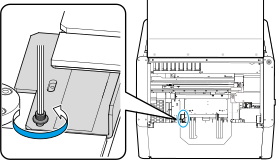
- Print-head carriage
- Remove the lower screws using the included hexagonal
wrench.
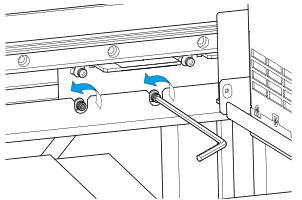
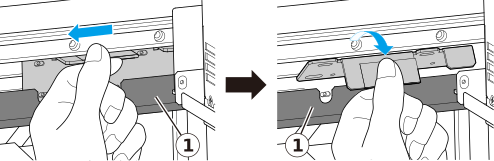
- As shown in the following figure, remove the upper
screws while supporting the retainer with your hand.
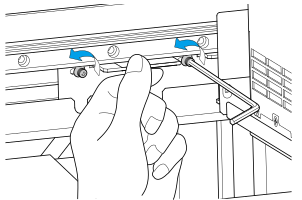
- Remove the print-head carriage's retainer. IMPORTANT
As much as possible, avoid touching part of the head gap sensor when removing the retainer.
Deformation of the head gap sensor may lead to malfunction or machine damage.
-
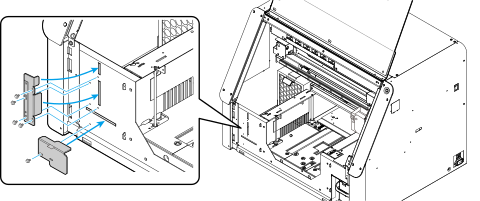
Attach the retainers to the printer according to the following
procedure.
-
Attach the screws to fix the retainers into place.
-
Attach the screws to fix the retainers into place.
-
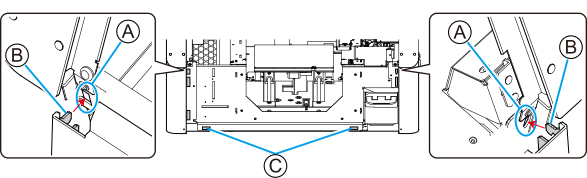
Attach the maintenance cover according to the following
procedure.
-
Secure the maintenance cover in place using the magnets
(C).
-
Secure the maintenance cover in place using the magnets
(C).
- Close the front cover.