
Normal Cleaning
Procedure
-
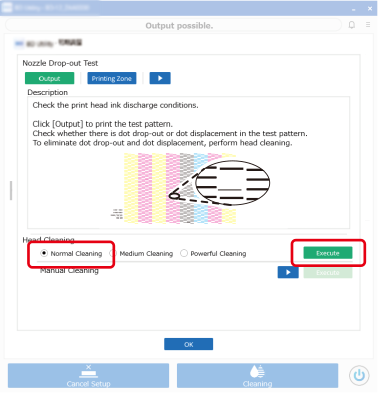
Select Normal Cleaning under Head Cleaning, and then click Execute.
Normal cleaning will start.
-
Click Output under Nozzle Drop-out Test.
The nozzle drop-out test will start.
MEMOIt is recommended that you replace the nozzle drop-out test paper with different media, or else change the print position with Printing Zone, so that there is no overlap with the previous test pattern.
To change the print position, refer to Step 3 in 3. Setting the Print Origin.
- When printing is complete, open the front cover.
-
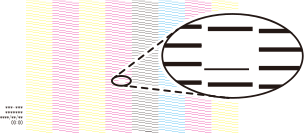
Check whether there is dot drop-out or dot displacement in the test pattern.
Missing blocks indicate dot drop-out. Collapsed or inclined blocks indicate dot displacement.
 MEMO
MEMO- If there is no dot drop-out or dot displacement, click OK.
- If the problem persists, try performing normal cleaning again.
- If problems such as dot drop-out and dot displacement persist even after you have performed normal cleaning two or three times, perform medium cleaning.