
Changing the Printing Area
When you want to print a slightly larger size, change the printing area registered for the media.
Procedure
-
Load the object.
Select the media that you want to change the printing area for.
-
Tap
 .
.
-
Tap .
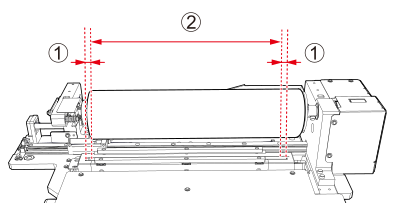
The maximum printing area is as follows.
-
12.5 mm (0.49 in.; []) to the inside from the left and right sides of the irradiation window of the UV-LED device. This area is indicated with .
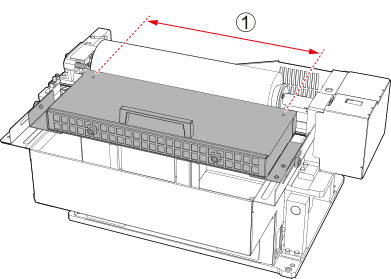
- For models with the UV-LED device located in front of the support table:
The maximum printing area is , the area to the inside from the alignment holes on the left and right sides of the top of the UV-LED device.
-
- Select Print Origin.
-
Tap
 or
or  .
The pointer moves.
.
The pointer moves. -
Tap or to move the pointer and set the right edge of the printing area.
- Select Printing Area.
-
Tap or to move the pointer and set the length from the right edge of the printing area.
- Tap Save Settings.
-
Close the front cover.
MEMO
Be sure to hold the handle of the front cover and keep holding it until the cover is completely opened or closed.
If you do not open and close the front cover gently, it may break or you may be injured.