
Measuring the UV Light Amount
Check whether the machine is able to print on the installed object.
Shine UV light on the object and measure the amount of UV light that passes through it. The optimal light amount is less than 10 μW/cm2.
IMPORTANT If the measured value exceeds the prescribed light amount of 80 μW/cm2,2it is not possible to print on that object. The ink near the nozzle will be hardened by the UV light. This may make restoration impossible and force the replacement of the print head.
| Required item |
|---|
 |
| UV intensity meter*1 |
*1 Prepare the UV intensity meter (FUSO CENTER-532).
Procedure
-
Put on a protective face shield, protective eyewear, and protective gloves.
For the equipment and clothing of the person performing the work, refer to "Safety Precautions."
-
Confirm that the object has been loaded onto the rotary device.
If it has not been loaded, UV light measurement is not possible.IMPORTANT Confirm that there is no gap between the loaded object to be printed on and the irradiation window of the light shield cover. If there is a gap, attach the light blocking sheet to the light shield cover. This prevents UV light from passing through the gap.
-
Tap
 .
.
- Tap .
- Open the front cover.
-
Tap Measurement.
-
Press the green button on the UV intensity meter to turn on the power.
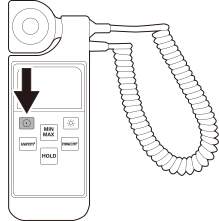
-
Bring the UV intensity meter close to the object to be printed on from above the light shield cover for measurement.
Confirm the UV light amount is 80 μW/cm2or less.
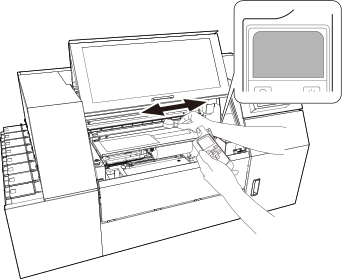 IMPORTANT
- Make sure the UV intensity meter does not come into contact with the light shield cover during measurement. Failure to do so may result in the machine malfunctioning.
- Keep the UV intensity meter about 0.5 to 1 cm (0.2 in. to 0.39 in.) away from the object.
- Perform measurement across the entire object for about three round trips.
- 80 μW/cm2or less, confirm that there is no gap between the object and the light blocking window of the light blocking cover. If there is a gap, attach the light blocking sheet to eliminate the gap. Also, if the object is empty (such as a cup), adjust the UV light amount by placing the included light blocking insert inside the object so that there is no gap.
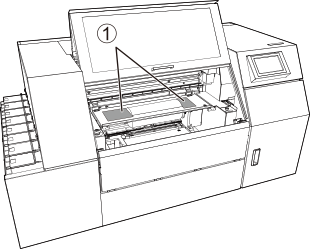
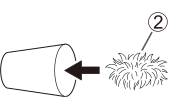
-
Press the green button on the UV intensity meter to turn on the power.
- Tap Finish.
-
Tap Exit.
If you want to measure again, tap Remeasure.
-
Tap the measurement result.
Measurement result Description <10 μW/cm2 The optimal UV light amount. 10 μW/cm2~80 μW/cm2 To protect the heads, cleaning is always performed before printing. - Tap Save.
- Close the front cover.
-
Tap
 .
The home screen appears.
.
The home screen appears.