
2. Setting the Computer's Network (Mac)
Use the information you have prepared through discussions with the network administrator to set the computer's network. If you have already set the network, the settings here are not necessary.
IMPORTANT
In an environment where the computer being used is connected to multiple network devices and the Internet, inappropriate settings will have a large effect on the entire network. For detailed information about the settings, consult your network administrator.
The method introduced here for setting the network settings applies to the following Mac version. Even with the same version, the operation steps, button names, and screen titles may differ depending on the OS build.
- Mac: macOS 26.5
Procedure
- Log on to the Mac as the Administrator.
- From the Apple menu, click System Settings....
- Click or the name of the network (when using Ethernet).
- Click Details....
- Click TCP/IP.
- Configure the following settings.
- Enter the IP address, Subnet mask, and Router.
For Router, enter the Default Gateway.
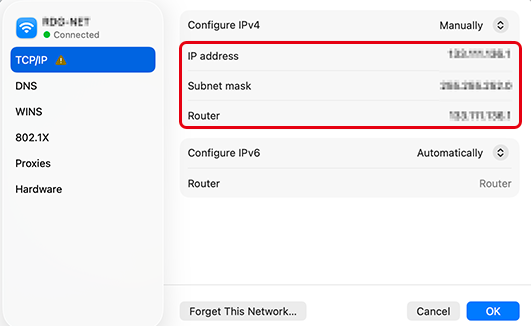
- Enter the IP address, Subnet mask, and Router.
- Click OK.