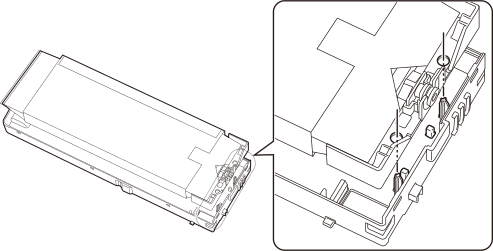
Method for Ink Renewal Inside Damper
Ink Renewal Inside Damper can be used to stabilize the output colors by replacing the ink.
-
Ink Renewal Inside Damper consumes more ink than Powerful Cleaning.
-
When you perform Ink Renewal Inside Damper, replace all the ink pouches other than those in the C, M, Y, and K ink cartridges with new ink pouches. If the ink runs out during cleaning, a Cleaning Error (Ink Cartridge) will occur and cleaning will stop.
The ink pouches that you have removed can still be used in operations other than ink renewal inside the damper (such as printing).
-
Appuyez sur
 .
.
- Tap .
- Replace all the ink pouches other than those in the C, M, Y, and K ink cartridges with new ink pouches.
-
Tap
Execute.
Cleaning will start. On completion, you will return to the original screen.
RAPPELIf Discard the discharged fluid in the bottle. appears after tapping Execute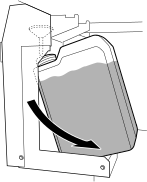
1. Remove the drain bottle and discard the discharged fluid.IMPORTANTWhen you remove the drain bottle, a few drops of discharged fluid may come out of the machine. Exercise caution to prevent this fluid from soiling your hands or the floor.
2. Quickly attach the emptied drain bottle to the machine once more.
3. Tap Finish.
ATTENTIONAvant de détacher la bouteille de vidange, attendez que l’écran affiche Discard the discharged fluid in the bottle.. Après avoir jeté le produit déchargé, fixez rapidement la bouteille de vidange à la machine.
Si vous ne suivez pas cette procédure, le liquide qui s’écoule du tube peut se répandre et salir vos mains ou le sol.
AVERTISSEMENTNe placez jamais le produit ou l’encre déchargé près d’une flamme nue.
Cela pourrait provoquer un incendie.
ATTENTIONPour entreposer temporairement le produit déchargé, placez-le dans la bouteille de vidange fournie ou dans un contenant scellé durable, comme une boîte métallique ou un réservoir en polyéthylène, et refermez hermétiquement le contenant.
Tout déversement ou fuite de vapeur peut causer un incendie, une odeur ou une détresse physique.
IMPORTANTDo not store discharged fluid in a location where it is exposed to direct sunlight.
When temporarily storing discharged fluid in the included drain bottle, do not store it in a location that is exposed to direct sunlight. The discharged fluid may harden, making the drain bottle unusable. The drain bottle may also deteriorate, leading to discharged fluid leaks.
IMPORTANTDispose of discharged fluid properly, in accordance with the laws in effect in your locale.
Discharged fluid is flammable and contains toxic ingredients. Never attempt to incinerate discharged fluid or discard it with ordinary trash. Also, do not dispose of it in sewer systems, rivers, or streams. Doing so may have an adverse impact on the environment.
- If uneven output color issues with white ink are not resolved even after performing Ink Renewal Inside Damper, perform Ink Renewal.
-
Tap
 to return to the home screen.