
Étape 2: Normal Cleaning Method
RAPPEL
If the object to be printed on is set up before Normal Cleaning is performed, After cleaning, perform a printing test. will be displayed on the Normal Cleaning menu screen. When this setting is turned on, Printing Test will be performed after Normal Cleaning even if Nozzle Drop-out Test is not performed.
Procédure
-
Vérifiez le groupe avec perte de points ou déplacement de points en visualisant les résultats du test d'impression.
L'espace de "A" à "B" est le groupe A. L'espace de "B" à droite se trouve le groupe B.
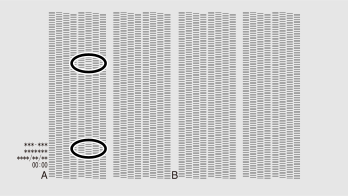
RAPPELSi les résultats du test d'impression sont difficiles à interpréter
Vérifiez les résultats dans un endroit lumineux, en changeant votre ligne de vision. Ils sont visibles grâce à la réflexion de la lumière.
- Tap Cleaning.
-
Tap Normal Cleaning.
The screen shown below appears.
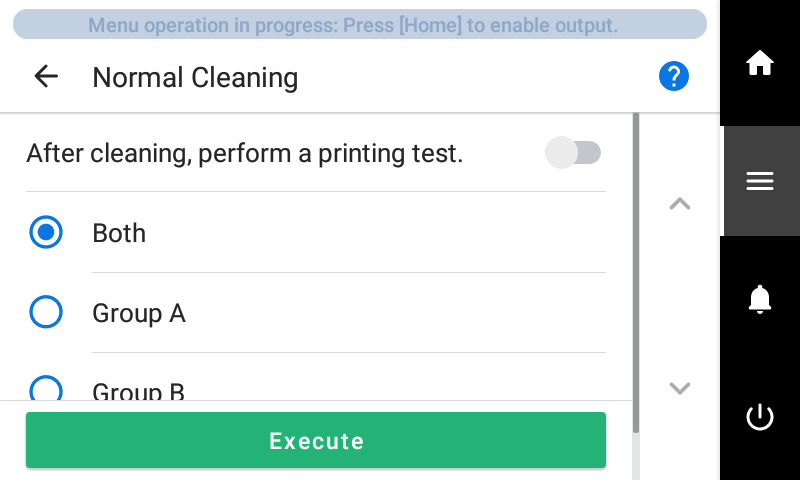
- Select the group of print heads to clean.
-
Tap Execute.
Cleaning will start. The details of the operation in progress and the (approximate) remaining time of that work are displayed in the status bar at the top of the screen.
When the work is finished, the status bar returns to its original display.
-
Tap
 .
.
- Perform a printing test again.
-
Check to make sure the dot drop-out or dot displacement has
been corrected.
If the problem persists, try performing normal cleaning again. If the printer has been used for a long period, dot drop-outs may not be fixed even after performing normal cleaning two or three times. If this is the case, clean using a different method.