
Operation Panel
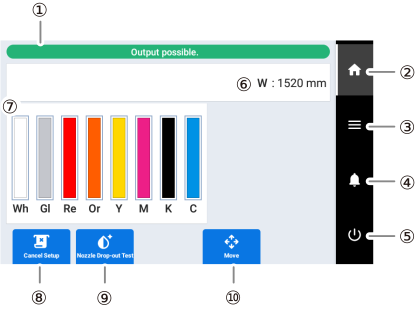
| No. | Name | Details |
|---|---|---|
| Status bar | Displays the printer status and indicates the next operation. | |
| Home | Displays the home screen. | |
| Menu | Displays various setting menus. | |
| Notifications | Displays important information. When there are notifications, their number is displayed next to the icon. | |
| Sub power | Switches the printer unit's sub power off. | |
| Media information | Displays the width (W) of the printing area. | |
| Amount of ink remaining | Displays the amount of ink remaining in each cartridge. If it is time to replace a color,
 is displayed next to the corresponding ink cartridge. Tap this icon to display the detailed information for the ink. is displayed next to the corresponding ink cartridge. Tap this icon to display the detailed information for the ink.
|
|
| Setup/ Cancel Setup |
Starts/cancels setting up the object to be printed on. |
|
| Cleaning/ Nozzle Drop-out Test | Displays the menu related to cleaning and to the printing test (nozzle drop-out test) for checking for dot drop-out and dot displacement. | |
| Move |
Moves the printer unit and sub carriage. You can also set the position moved to as the right edge of the printing area (the base point). Réglage de l’emplacement de début d’ouvrage |