
Cleaning the Nozzle Surface (Only for Machines Equipped with White Ink)
When you perform the following types of printing, dot drop-out may occur with the white ink. To ensure that the printer is used without solidified ink and other contaminants adhered to the nozzle surface of the print head, clean this nozzle surface.
-
When printing on acrylic and other highly reflective materials
Clean the nozzle surface for the white ink after work is finished on the day when you performed printing.
-
When printing for a total of 3 hours with a large distance between the object to be printed on and the print head
Clean the nozzle surface for the white ink after you have performed printing for a total of 3 hours.IMPORTANT Clean the nozzle surface after work is finished on the day when you performed printing. Leaving this cleaning to the following day may result in dot drop-out.
Procedure
-
Start manual cleaning.
Operate the machine's panel to start manual cleaning. When manual cleaning starts, the print-head carriage moves to the left.Cleaning around the Print HeadsMEMO Only use the manual cleaning in this section to clean the nozzle surface for the white ink. It is not necessary to clean the print head caps or the nozzle surfaces for the other inks.
-
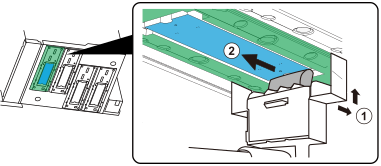
Clean the nozzle surface for the white ink.
Use the included head refresher, cleaning liquid, and cleaning sheet to clean the nozzle surface for the white ink.
- Follow the instructions on the operation panel to finish manual cleaning.