
1. Performing a Printing Test for the Nozzle Mask
Procedure
-
Set up the object to be printed on.
Determining the Print Surface Height and Printing Position
For a printing test, set the printing area with W (width) of 185 mm (7.29 in.) or more and L (length) of 136 mm (5.36 in.) or more. An error will occur and printing tests cannot be performed if the area is smaller than this.
-
Tap
 .
.
- Tap .
-
Select Nozzle Mask Test and tap Execute.
Printing of the test pattern starts.
- Check for the nozzle group with dot drop-out or dot displacement by viewing the results of the printing test.The results of the printing test are displayed separately for nozzle groups "1" and "2." The following shows a dot drop-out in nozzle group 1.
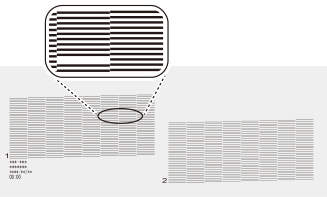
MEMOIf the printing-test results are difficult to interpret
Check the results in a bright location, changing your line of vision. They are visible using the reflection of the light.
-
Tap
 to return to the home screen.