
If the Print Heads Still Do Not Move
Procedure
- Switch off the sub power.
- Turn off the main power switch.
- Open the front, left, and right covers.
-
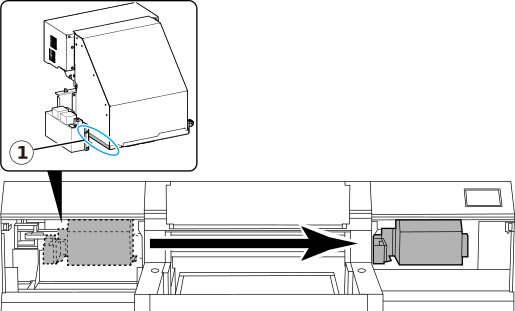
Grasp the specified position (indicated with in the figure) and gently move the print-head carriage to the standby position.
Stopping at the place where the audible click is heard locks the print-head carriage in place.CAUTION
When moving the print-head carriage by hand, be sure to hold the specified position.
Moving it by holding positions other than those specified may deform and damage the cover.
IMPORTANTWhen moving the print-head carriage by hand, check that it does not come in contact with the wiper, print head cap, or other parts. If it does come into contact with the wiper or print head cap, the print-head carriage cannot be moved to the standby position and should be left in place.
-
Gently apply pressure from the right side to make sure the print-head carriage does not move to the left.
If the print-head carriage moves to the left, move it again slowly by applying pressure from the left side and make sure it locks in place.
- Close the front, left, and right covers.