
Did you shake the ink cartridges before installing them?
Every day before starting work, remove the white ink cartridge, shake it 50 times (about 20 seconds), and then reinsert it.
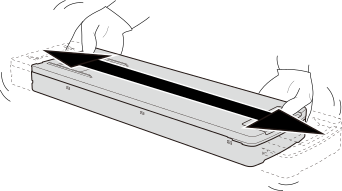
Shake the ink cartridges:
- White ink: When replaced with a new cartridge and each day (before starting the day's operations)
- Ink other than white ink: When replaced with a new cartridge or when uneven color issues occur
MEMO
To prevent ink precipitation, you can make the machine periodically display a message prompting you to mix the ink.
IMPORTANT
-
The ingredients in white ink tend to settle.
Allowing the ink to stand without shaking it can cause the settled material to harden, resulting in malfunction or other problems.
-
Before shaking the ink cartridge, wipe off any ink from around its mouth.
If you do not wipe off the ink, it may splatter when you shake the ink cartridge.
-
When you have finished mixing the ink, reattach the ink cartridge immediately.
Taking time to reattach the ink cartridge will adversely affect the ink path.