
Front
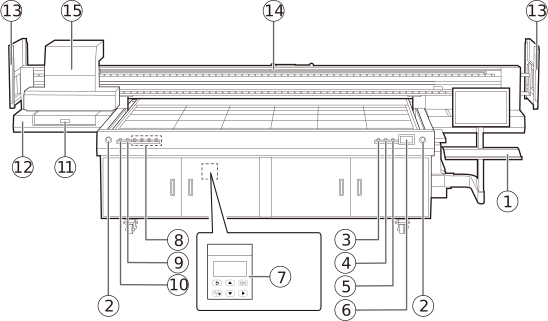
| No. | Name | Function overview |
|---|---|---|
| Computer holder | Installs a computer for operating this machine. | |
| Emergency stop buttons |
Forcibly interrupts the power supply to stop all operations of the machine immediately or recovers from an emergency stop. |
|
| [On] button |
Press this button to turn on the sub power of the machine. | |
| [Off] button |
Press this button to turn off the sub power of the machine. | |
| [Reset] button |
Press to fill the sub-ink tank of the print head with ink. Usually, the sub-ink tank is filled automatically. An alarm sounds to signal if the tank is not filled with ink completely within a specified time. Press this button to complete ink filling and stop the alarm. |
|
| Ink tank & alarm display |
This displays the amount of ink remaining. A warning is displayed when the amount of ink remaining is low. |
|
| Vacuum controller |
Adjusts the vacuum output. |
|
| [Vacuum Area] button |
Selects the area of the flat table to activate negative pressure at. |
|
| [Main Power of Flatbed Vacuum] button |
Turns the negative pressure pump power on and off. |
|
| [Home Position] button |
Extends and retracts the pins for positioning the object to be printed on. |
|
| Ink receiver |
This tray collects the ink discharged from the print heads to prevent clogging. |
|
| Maintenance station |
This is where the print heads are cleaned. Discharge ink and maintain the print heads here. |
|
| Proximity sensor |
This sensor detects intrusions into the movable range of the print-head carriage. When it detects an intrusion, it stops operation of the machine. |
|
| Gantry | Transports the print-head carriage forward, back, left, and right. | |
| Print-head carriage | Transports the built-in print heads and UV-LED device. |