Creating an Image Using the AI Image Generation Function

This section explains how to create a new image from text or a reference image using the AI image generation function.

Procedure
  1. On the function toolbar, click RDGCD_Icon_Layoutbar_AIImage AI.
    The operation panel is displayed on the right side of the window.
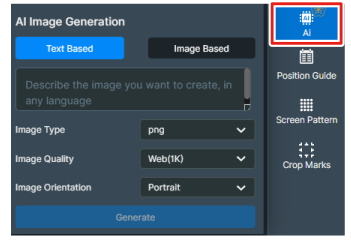
    RDGCD_UsefulFunctions_AIImge
  2. Create an image using the AI image generation function.
    1. Select the method for image generation.
      • Text Based

        Enter text that describes the concept of the image and create the image.

      • Image Based

        Upload a reference image, then enter text that describes the concept of the image and create the image.

    2. Specify the quality and size of the image to generate and click Generate.
    3. Select your preferred image from the generated image candidates.
      Click Place Image to place the image in the canvas. To edit an image, select Image Based.