
Managing Created Designs
-
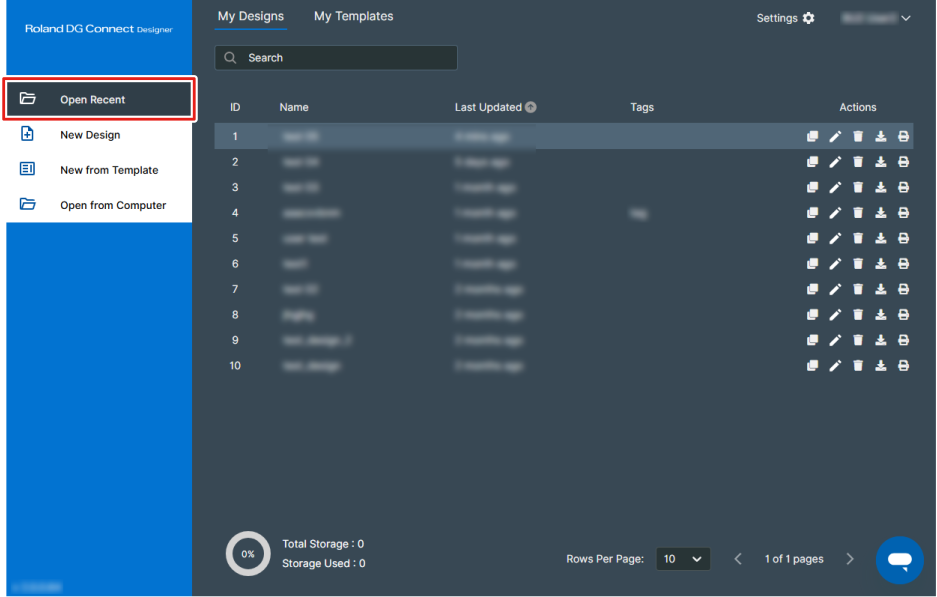
From the dashboard, click Open Recent.
-
Manages the designs or templates you have created.
Designs and templates you have created are saved in My Designs and My Templates, respectively. You can switch between design and template displays by switching tabs.
Click an icon in the Actions column to edit, manage, print, and perform similar operations for designs and templates. If you are using a paid module, you can download files in PDF format.
You can also click Print to send the print job directly to VersaWorks without opening the design window.
It is a good idea to manage your designs and templates with appropriate names and tags so that you can easily search for them.
If the amount of saved data reaches the upper limit, you will not be able to create a new design. Perform the following actions to increase the amount of available storage.
Purchase additional storage to increase the Total Storage.
https://connect.rolanddg.com/#/setting/storage-management- Delete existing designs and templates.
- Delete uploaded files from .