
Software to Be Used
The software to be used is listed below.
In this manual, "Roland DG Connect Hub" is written as "Connect Hub," "Roland DG Connect Designer" as "Designer," "VersaWorks 7" as "VersaWorks," and “BY Utility" as "Utility."
| Connect Hub | System hub software. The major functions are shown below.
|
|
| Designer | Design software used on Roland DG Connect. The software makes it easy to create print data, set print settings such as media and quality, and output via VersaWorks. |
|
| VersaWorks 7 | Software RIP (Raster Image Processor). For more information on the functions, see the VersaWorks 7 manuals. |
|
| Utility | Software that is needed to operate the machine. The major functions are shown below.
|
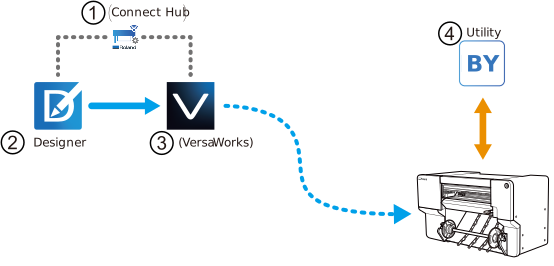
When using commercially available design software such as Adobe Illustrator or CorelDRAW, the created data (.pdf, .ai, etc.) can be imported into Designer for editing. The data can also be directly imported into VersaWorks and output after configuring the print properties.