
Ink Pouch Replacement
WARNING
Never store ink, cleaning liquid, or discharged fluid in any of the following locations.
- Any location where high temperature may occur
- Near bleach or any other such oxidizing agent or explosive material
- Any location within the reach of children
Accidental ingestion by children may pose a health hazard.
IMPORTANT
Precautions regarding ink pouch replacement
- Be sure to replace each pouch with an item of identical type and color.
- Never use an ink cartridge that has already been used in another machine even if it is an identical type.
- Never mix different types of items. If the optimizer ink and color ink mix, the ink may harden and cause a malfunction.
- Never leave the machine with an ink cartridge removed. The print heads may become clogged.
- Never insert or remove ink cartridges with undue force. Ink may leak.
- Set ink cartridges in the correct positions. Check that the color names indicated on the ink slot labels match the color names indicated on the ink cartridge labels.
- Handle ink pouches carefully to prevent them from dropping and rupturing.
- Use ink before its expiration date.
Procedure
-
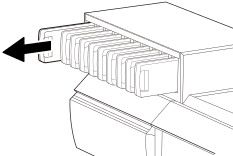
Pull out the cartridge of the color to replace.
-
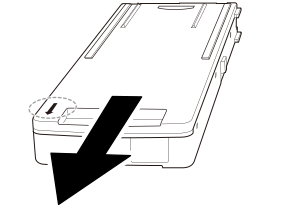
Remove the cover of the cartridge.
- Keep the side with the arrow mark face up.
- Remove the cover by sliding it in the direction indicated by the arrow.
-
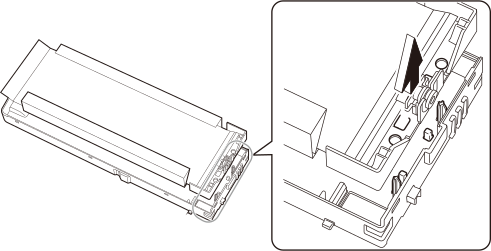
Remove the used pouch from the cartridge case.
-
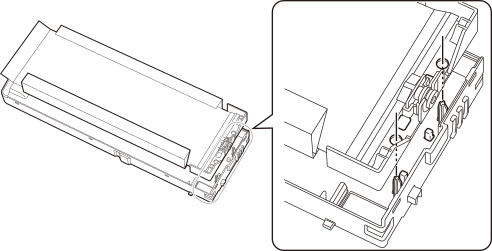
Set the pouch into the cartridge case.
MEMO
To set the pouch in the correct position, pass the protrusions on the cartridge case through the holes in the pouch.
-
Attach the cover to the cartridge case.
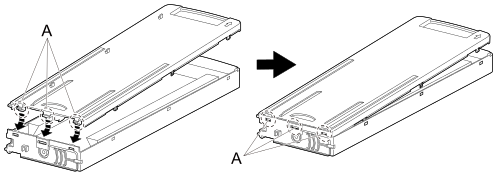
- Insert the protrusions (A) at the back of the cover into the holes in the cartridge case.
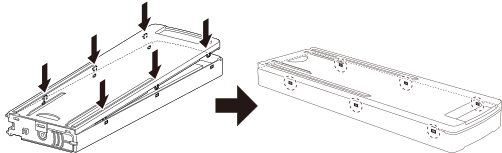
- Push the cover to fit its hooks into the holes in the cartridge case.There are hooks in six locations. Check that all the hooks are seated in the holes and that the cover does not come loose from the cartridge case.
- Insert the protrusions (A) at the back of the cover into the holes in the cartridge case.
-
Insert the ink cartridge into the slot it was pulled out from.
Insert the ink cartridge as far as it will go. If the inserted ink or cleaning liquid is not recognized and does not show up on the operation panel, remove the cartridge and insert it again.
If the machine recognizes the insertion of the cartridge, a prompt is displayed on the operation panel. Tap Yes.