

再利用コンテンツ - step

  • Open View devices and printers.
    • Windows 10

      From the start menu, click Windows System - Control Panel - View devices and printers.

    • Windows 8.1
      1. Click Desk top.
      2. Move the mouse to the lower right corner to display Charm and click Settings.
      3. Click Control Panel - View devices and printers.
  • Move the left media guide to the left edge.
    1. Push the loading lever () backward.
    2. Move the left media guide () to the left.
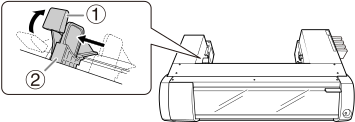
    BN-20A_MediaSet_1
  • Display the BN-20 driver's Printing Preferences screen.How to Open the BN-20 Driver's Printing Preferences Screen
  • Open the Utility window.
  • Read the on-screen instructions and then enter a value in the New Value box.
  • Click Apply.
    The value in Current Value changes to the entered value.
  • Click Close.
  • Load the media to be cut.